
CollabPlane Workbench

SIP and call troubleshooting

Find out why
the call failed.

Workbench is a set of troubleshooting tools for voice engineers. Load a SIP trace, a packet capture, or a call manager log, or pull one from the device, and read the call as a ladder with the differences marked.

Workbench is delivered as a hosted service. There is nothing to install except the on-site collector, where one is needed. Workbench includes a 14-day trial; ask sales to start one.

Call comparison
MessageWorking callFailed call
INVITESentSent
Codecs offeredG.711, G.729G.729 differs
100 TryingReceivedReceived
Final response200 OK488 Not Acceptable Here differs
Illustration with example data. Not an application screenshot.

What Workbench does

SIP trace and capture analysis

Turn debugs, logs, and packet captures into call ladders. Score media quality and export audio from captured calls.

Call comparison

Put a working call beside a failed one and see which messages and fields differ.

One call across devices

Search by a call identifier or a number and follow each leg from the SBC to the call manager to the cloud.

Capture from the device

Start a time-boxed capture on Cisco, AudioCodes, and Ribbon devices through an on-site collector.

Rule builders

Build SIP profiles and voice translation rules, test them against a real message, and push them with a saved rollback.

Cloud call records

Retrieve Microsoft Teams, Webex Calling, and Zoom Phone call records to set beside your own capture.

Compare calls, message by message

Select the image to open it at full size.
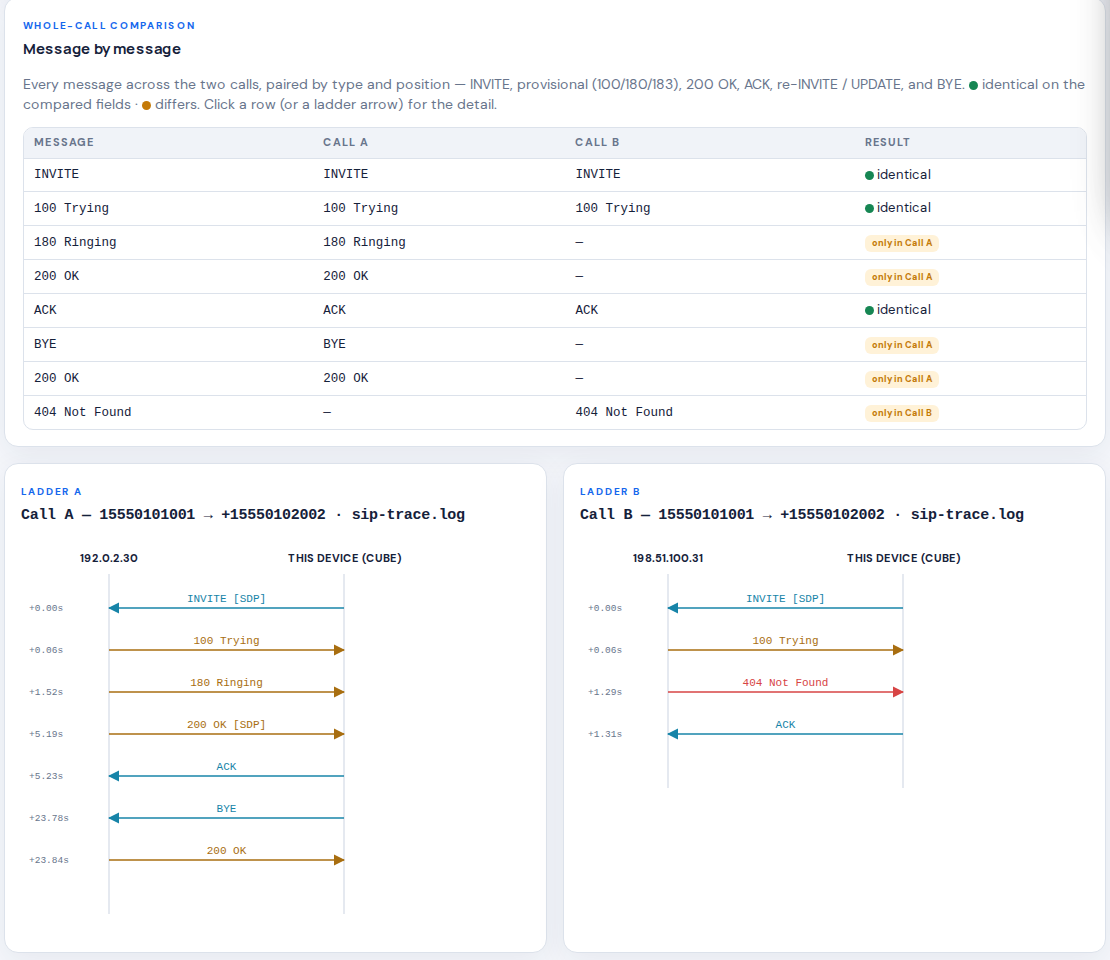
Call comparison showing a message-by-message table for two calls and side-by-side call ladders, using example numbers and documentation IP addresses.
Workbench call comparison, shown with example trace data. View full size

Everything in Workbench

29 tools. One sign-in.

Each tool does one job. Results from one feed the others, so a call found in a capture can be opened in a comparison or saved to a case.

Analyze

SIP Trace Analyzer
Turns CUBE debugs, syslog and Wireshark text exports into call ladders and flags failure signatures.
Call Comparison
Two calls side by side, message by message, with the differing headers and SDP fields highlighted.
PCAP Analyzer
Reads SIP and RTP from a packet capture, scores media quality, detects DTMF and exports audio.
PCAP Comparison
Correlates one call across captures taken at different points in the path.
CUCM Trace Analyzer
Rebuilds the call flow from Cisco Unified CM call logs across cluster nodes.
End-to-End Troubleshooting
Joins call manager logs, gateway debugs and cloud call records into one call.
Dial-Peer Lens
Shows which inbound and outbound dial-peers a CUBE matched for each call.
CCAPI Flow
A per-call timeline from the gateway call-control debug: legs, codec negotiation, connect and disconnect.
WebRTC Stats
Reads a browser getStats dump from a Teams, Webex or Zoom web client.
Call Spine
Search by any call identifier or number and see every leg recorded for that call.
Investigations
Save an analysis as a case with its conclusion and a report to hand to a vendor or customer.
Voice Reference Tables
Disconnect cause codes and codec, tone and fax values in plain English.

Capture and record

Cisco VoIP Trace
Searches the trace buffer a CUBE keeps, whether or not anyone was debugging.
AudioCodes Capture
Runs a filtered packet capture on an AudioCodes SBC and analyzes the result.
Ribbon SBC Core
Reads signaling ports and counters and runs an audited call trace on a Ribbon SBC Core.
SIPREC Recorder
Records a call as the SBC hears it, with each audio stream labelled by participant.
Recordings
Records a device for a fixed window that always ends by itself.
Call Test
Places a real test call through a trunk, gateway or SBC from inside your network.
Collector Agents
An on-site agent that reaches devices on private networks and connects outbound only.
Devices
Your saved devices, private to your account, with encrypted credentials.

Build and test

SIP Profile Builder
Builds CUBE SIP profile rules and gives you paste-ready configuration.
SIP Profile Tester
Runs a SIP profile against a real message and shows the before and after.
Voice Translation Rule Builder
Answers plain questions and produces a correct Cisco voice translation rule.
Config Audit
Every configuration change pushed from Workbench: who, what, where, when, with a backup and a rollback.

Cloud call records

Microsoft Teams
Pulls Direct Routing and PSTN call records and lines them up with your SBC legs.
Webex Calling
Retrieves detailed call history for a date range or number.
Zoom Phone
Retrieves call history and quality data for a date range or number.

Integrations

Recommendations
Points to the element and layer most likely at fault and suggests next steps.
ServiceNow
Pulls a trace attached to an incident, analyzes it, and posts the findings back.

Platforms

What Workbench works with

Coverage depends on software release. Ask sales to confirm the versions you run.

What Workbench does on each platform
Cisco CUBE and Unified CMAudioCodes SBCRibbon SBC Core
Read signaling from device logsYesYesYes
Packet capture started from WorkbenchYesYesYes
Call recording with SIPRECYesYesYes
Trunk and peer statusYes—Yes
Configuration builders with push and rollbackYes——
Cloud call records Workbench can retrieve
Microsoft TeamsWebex CallingZoom Phone
Call records lined up with your own captureYesYesYes

Is Workbench right for you?

Where did these calls behave differently?

For individuals and teams investigating UC faults and reviewing configuration.

Start with
Supported SIP traces, packet captures, CUCM logs, and the configuration context for the affected call.
Work toward
Call comparisons, signaling and media observations, and findings to guide the next scoped test.
  • Compare successful and failed calls side by side.
  • Review signaling and media evidence from supported inputs.
  • Use configuration tools to investigate a specific engineering question.

An example

Two calls. One useful difference.

Compare a successful call with a failed one. Follow the signaling, correlate available media evidence, and capture the configuration context needed to test a specific explanation.

  1. 1Scope the affected call
  2. 2Collect the relevant evidence
  3. 3Compare signaling and media
  4. 4Review the proposed change

Buy Workbench by itself.

No other CollabPlane product is required. Workbench is a hosted service with a 14-day trial; contact sales for pricing and availability.

Supported inputs and device actions depend on the platform and software release. Ask sales to confirm yours.